
Your team's ideas. Your actual software.
Connect an existing project or start something new. Croft works with the software your business runs, so the improvements go where they matter.
The people who know what needs to change can finally change it.
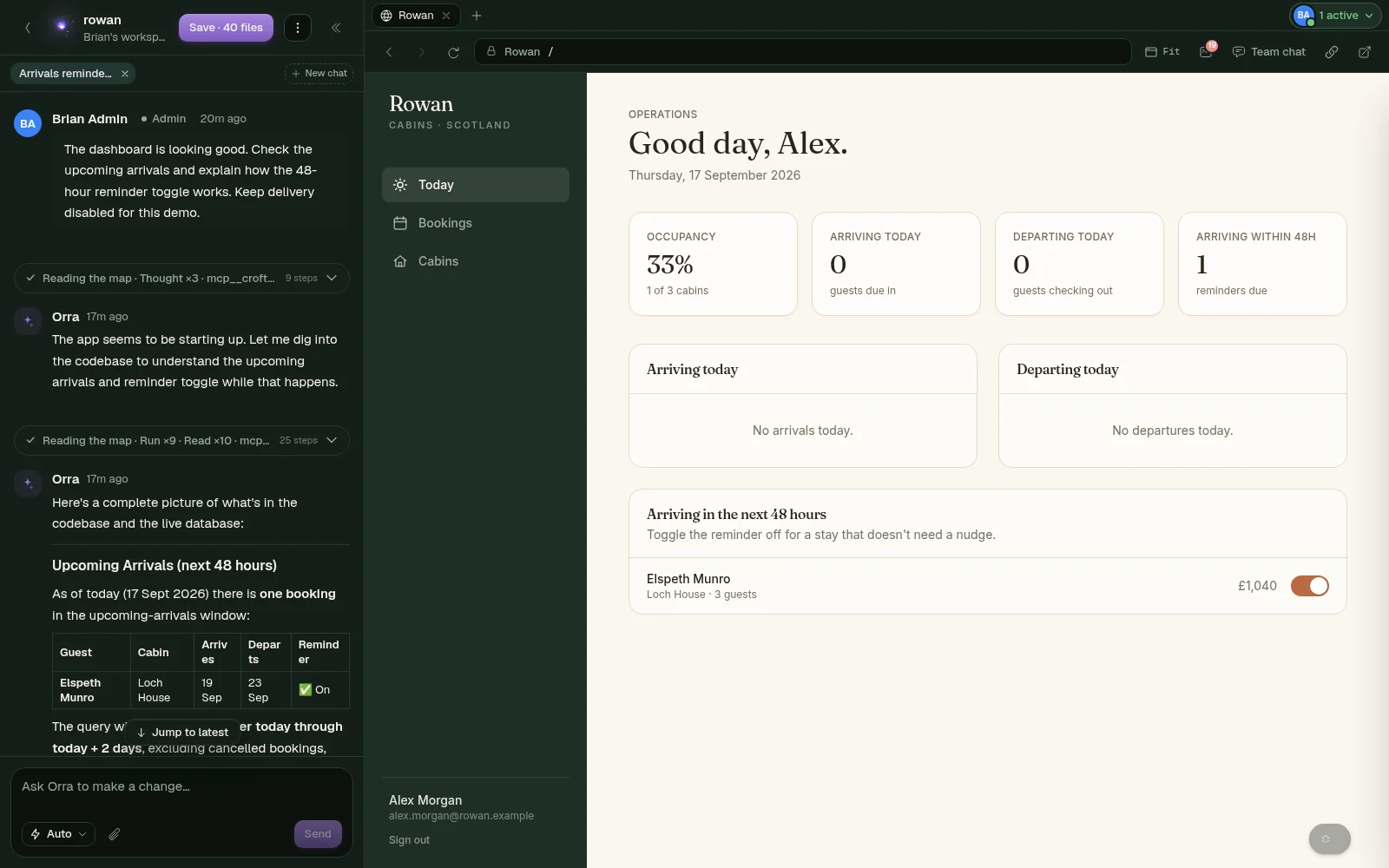 A conversation. A working product.
 Real Croft. Fictional business. A closer look at how work becomes software.
In good company. Teams building with Croft.
 Musterworks
 AutoComms
 polar
polar
From “could we?” to “it's live.”
The booking rule that needs changing. The report everyone asks for. The idea that never makes it to the top of the queue. Give it to Orra, and work through it together.
The workspace
Tell Orra what you need. Watch it take shape in a live copy of your app. Click around, check the details and ask for the next improvement.
Chat and the running product, side by side.
Captured in Croft · Rowan demo projectPrototype mode
Switch to Prototype and ask for a welcome card, a quicker drawer, a calmer dashboard. Orra returns a round of takes side by side, styled from your own app, with nothing changed underneath. Pick one, ask for another round, or build the one that feels right.
Three takes. Nothing in the app has changed.
Captured in Croft · Rowan demo projectRecorded decisions
Agree the details that matter, then keep the answer with the work. Here, Rowan's confirmed arrival policy has unlocked the cabin instructions that were waiting on it, and the next ticket after that.
A confirmed policy. The next work unlocked.
Captured in Croft · Rowan demo projectThe plan
See the work in dependency order. The plan follows what has actually shipped, so your team spends less time moving cards and more time moving forward.
Real dependencies. A clear next step.
Captured in Croft · Rowan demo projectLive preview
Open a booking. Try a filter. Check the reminder. Review the real experience your customers and teammates will use, then decide whether it is ready.
A working app you can actually try.
Captured in Croft · Rowan demo projectThe Glen
The Glen gives your project a landscape of its own. Return to your work, see what is happening and pick up the conversation where you left it. Step away and the workspace sleeps; come back and it wakes with everything intact.
A place to return to, as your product grows.
Captured in Croft · Rowan demo projectThere's a whole workshop in here
The preview is just the beginning. Your projects, data and running services are all within reach.
A window into your database
Open your database inside Croft. Browse tables, inspect a record, filter the rows or write a query. Here are Rowan's fictional bookings, in the real data browser.
SQL, when you need it
Use the query editor to explore the data behind a question. Check a result, inspect the rows and bring what you learn back to the work.
From an idea to a project
Describe what you want to exist, give it a name and choose where it lives. Croft creates a real project your team can keep building and your own repository to take with you.
The environment, in view
See the apps and services your project runs on. Manage its database and inspect the setup from the same place you build, with the detail there when you need it.
Captured in the real Croft app. Rowan and its records are fictional.
A little light. A lot of context.
Orra gets to know your software and the people building it. She asks the useful questions, makes the changes and checks her work in a real browser.
The decisions and discoveries stay with the project. Pick up tomorrow without starting from scratch. And when you are not sure where something lives in Croft, tap her and ask.
Meet Orra in a demo“Can we remind guests before they arrive?”
Let's work out the details first.
How far ahead should the reminder go?
What should a guest know before arriving?
What happens if the booking changes?
An illustrative conversation for Rowan
Ask Orra anywhere
Orra is on every page of Croft. Tap her and ask about the product, your setup or where something lives, and she answers in a sentence and offers the door.
Where do env variables live? How do I invite a teammate? What is a workspace? A short answer, then a door card to the exact page, tab or setting. You click it. She never navigates for you.
Ask her to turn on nightly backups or add a domain and she offers the change as a card with the confirm sentence written beside it. Anything secret, you type yourself.
Every door she offers is generated from the product itself, so her answers cannot drift from the build. New teammates get walked in the same way, one door at a time.
Built for the whole team
Croft is a place a team works, not a tool for one person. The people who run operations, support or finance build what they need. Everyone tries it in the same running app, on every screen it will be used on.
Every screen
Open the same page at several sizes at once. Each frame is a live copy of the real app, so a change shows everywhere the moment it lands. Pick a preset or drag an edge for a size of your own.
Together, in the app
See who is here. Talk it through in the team chat beside the preview and mention a teammate. Send a stakeholder a link to the running app, without handing over the workspace or the code.
The booking desk, the month-end report, the handover checklist. The team that needs the tool describes it, tries it and keeps improving it, while engineering keeps review and permissions.
How teams own their softwareConnect Claude Code, Cursor or any MCP client to Croft with an agent key. A key acts as the person who made it and can never do more than they could.
Roll back to an earlier prompt, or edit one and run again from there. Every step Orra took is there to read, so the team can see how the software got here.
Step away and your workspace sleeps. Come back and it wakes with every chat and change intact, and whatever a teammate saved in the meantime is pulled in for you.
Captured in the real Croft app. Rowan and its people are fictional.
Confidence, built in
Give your team room to improve things, with clear boundaries around the software your business depends on.
Connect an existing project or start something new. Croft works with the software your business runs, so the improvements go where they matter.
Click through the running app, check the details and bring a teammate in. Reviewing a change should feel like using your product.
Choose who can change what. Work outside those permissions goes for review, and sensitive actions pause for approval.
A home for production, too
Hosting is part of Croft. Set up production, choose from the available regions and give your app an address your customers can use.
Place the production app and its dedicated Croft-managed databases in your selected region.
Choose a separate production database, so the team can keep building against development data. Turn on nightly backups and restore from the same tab.
Start with a Croft address, then connect your own domain, one per app if you like. Review releases, read the logs and look at production with Orra from the same place.
Musterworks runs in Croft’s UK deployment.
Tell us what needs to live where. We'll walk through production hosting, development and the services involved.
Once it's live
Every production app on Croft has its own traffic view. Who visited, where they came from, what they looked at and how long they stayed, counted without cookies.
It opens with a sentence about what changed, not a wall of numbers. A slow page or a broken link is called out, and you can look at it with Orra.
Yes. Connect your GitHub project and Croft works out how to run it, including its dependencies and backing services. You can also start a new project in Croft. Bring your software to a demo and we can walk through what it needs.
No. Describe what you need in plain language, work through the decisions with Orra, then try the result in a live preview. Engineers can inspect the code and set permissions; the rest of the team can focus on how the software should work.
Permissions determine who can change each part of a project. Work outside a person's scope goes to a reviewer. Sensitive operations require explicit approval. When Croft runs a whole plan, the final merge is still a human decision.
Yes. Teammates share the same running app, see who is active, and talk it through in a team chat beside the preview. The preview shows a page at phone, tablet and desktop sizes side by side, so every screen gets checked before a change goes live.
Ask Orra. She is on every page. Tap her and ask where something lives or how to set it up, and she answers in a sentence and offers a door card that opens the exact page, tab or setting. She can make small changes for you too, with a confirm step. New teammates get walked in the same way.
Croft is free to start. Paid plans are per seat, hosting is priced per app by size, and there is no metered compute to watch. The pricing page has the details.
You do. Your project lives in a GitHub repository. You can clone it, move it or keep developing it with your own tools and team.
A walkthrough of deciding, planning, building and reviewing a change in Croft. Bring a real request your team has been waiting on. We will talk through your existing software, who needs access and how Croft could fit your team.

Make room for what's next
Bring one thing your team wishes the software could do.
We'll show you a different way to get there.